For Azure DevOps Services

Your AI teammate in Azure Boards

Boardmate writes better work items, breaks down work, plans sprint changes and answers questions from your backlog, wiki, code and Microsoft's documentation. It runs on your own AI provider and never writes anything without your approval.

  • 30-day free trial, no card
  • Bring your own AI
  • Hosted in the EU
Features

Everything a team needs from AI in Azure Boards

One extension for the work item form, the Boards hub and the settings pages.

Chat that knows your project

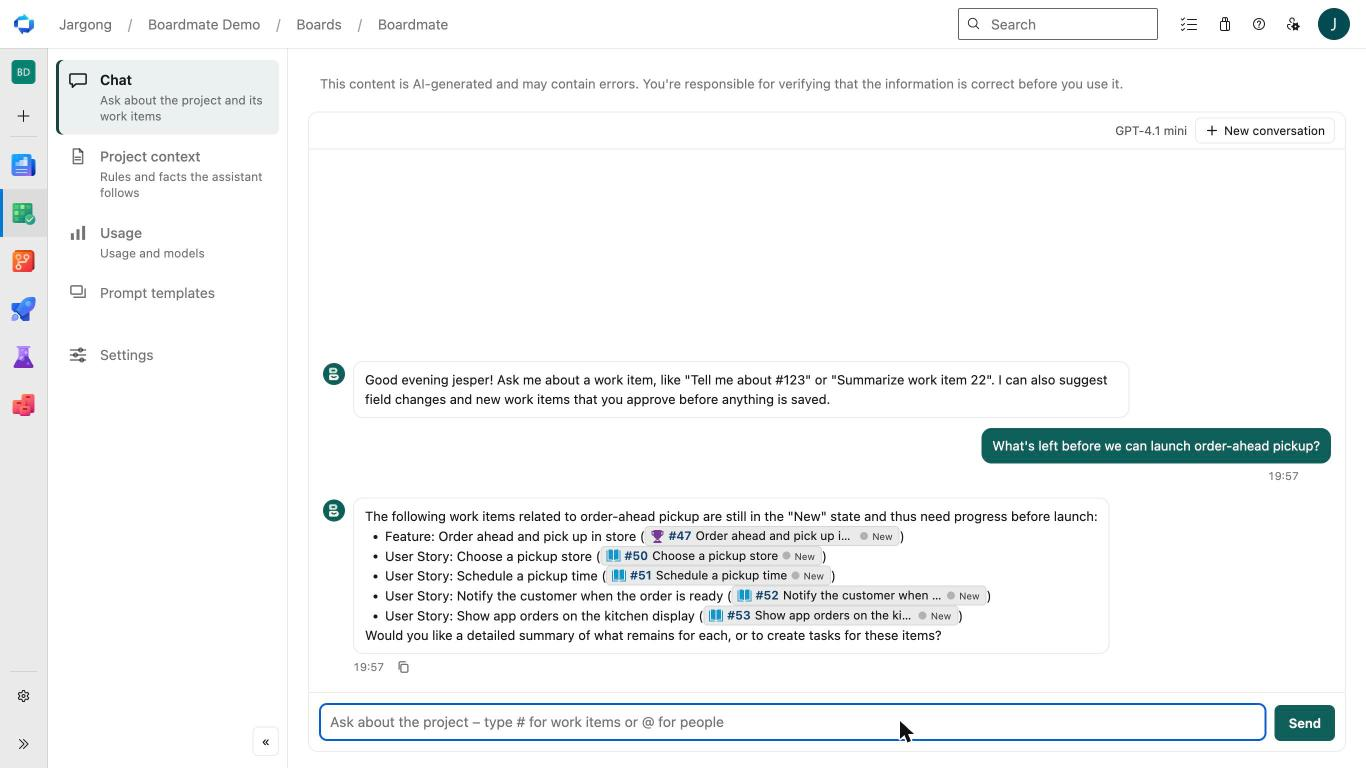
Ask in plain words and the assistant looks it up: work items and their history, saved queries, the project wiki, Markdown docs in your repos and Microsoft's Azure DevOps documentation, with source links under every answer.
Better work items in one click

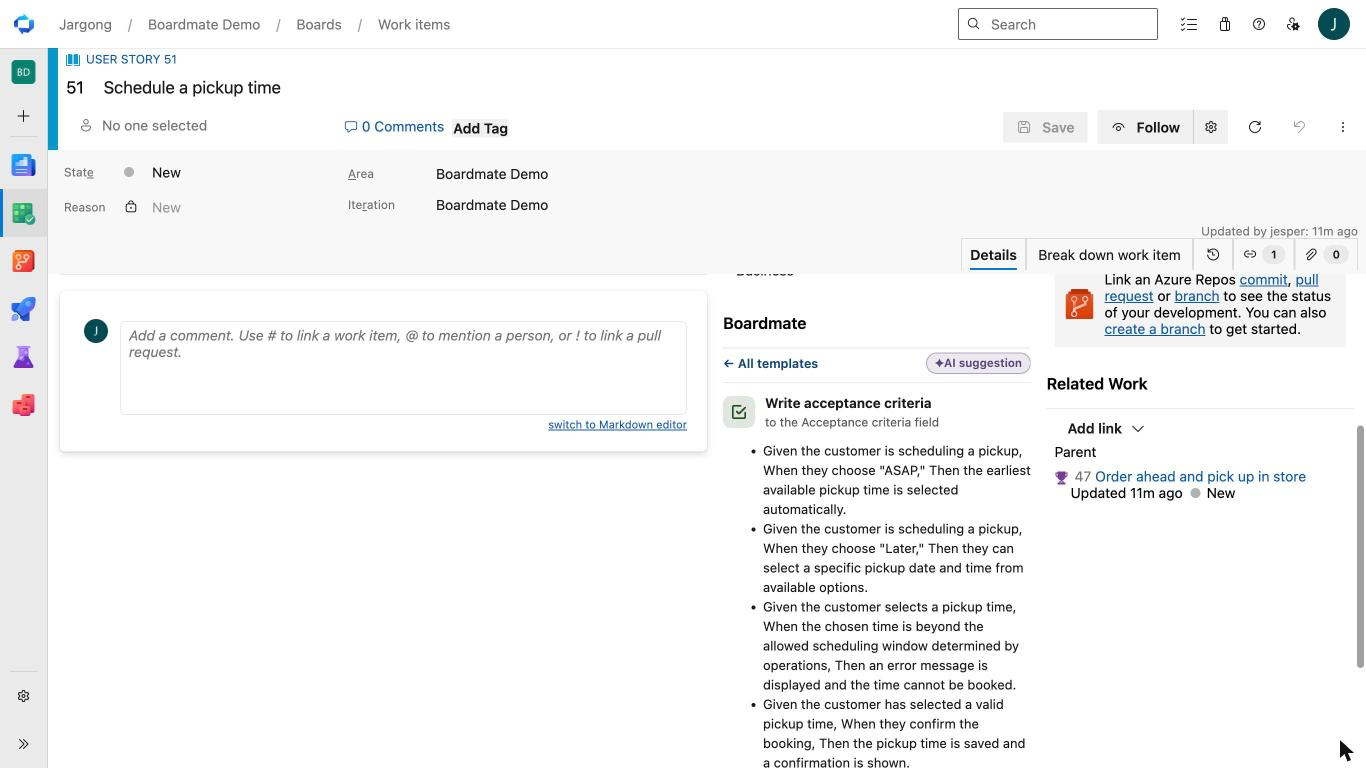
Templates on the work item form write descriptions, acceptance criteria, repro steps and summaries. Use the defaults or write your own per project or organization, pinned to wiki pages such as your Definition of Done.

Break down work items

Generate tasks under a story, stories under a feature or test cases for a requirement. Edit the titles, tick the ones you want and create them in bulk with the parent's area and sprint.

Insights and spec health

A 0–100 spec health score with rule checks, decisions and open questions pulled from the comments, and your project's own review checks. The rule checks are free forever.

Plans and bulk changes, approved by you

"Close sprint 11", "move the open bugs to Sprint 9" or "tag everything untouched for 60 days": the assistant drafts a step-by-step plan, you review it and run it. Nothing is written without your approval.

Code and pull requests, read-only

Find the pull requests waiting for your review, summarize a PR, search the code or show a file. Off by default; a project admin picks the repositories. Boardmate never changes code.

Also included: project context shared with every answer, a prompt library with test runs, image-safe rewrites, per-project field mapping, organization-wide settings and a usage view with CSV export.

See it in Azure DevOps

Where your team already works

Boardmate adds a hub to Boards, a panel to the work item form and a page to Organization settings. Nothing to install on anyone's computer.

Ask the backlog

"What's left before we can launch order-ahead pickup?" The chat reads the work items with your permissions and answers with live work item cards you can open in one click.

The Boardmate chat in the Boards hub listing the open work items for a feature as clickable cards

Fill the gaps on the form

Run a template from the Boardmate panel on any work item. Here it drafts testable acceptance criteria for a story that had none. Review it, then apply it to the field.

The Boardmate panel on a user story suggesting acceptance criteria for the Acceptance Criteria field

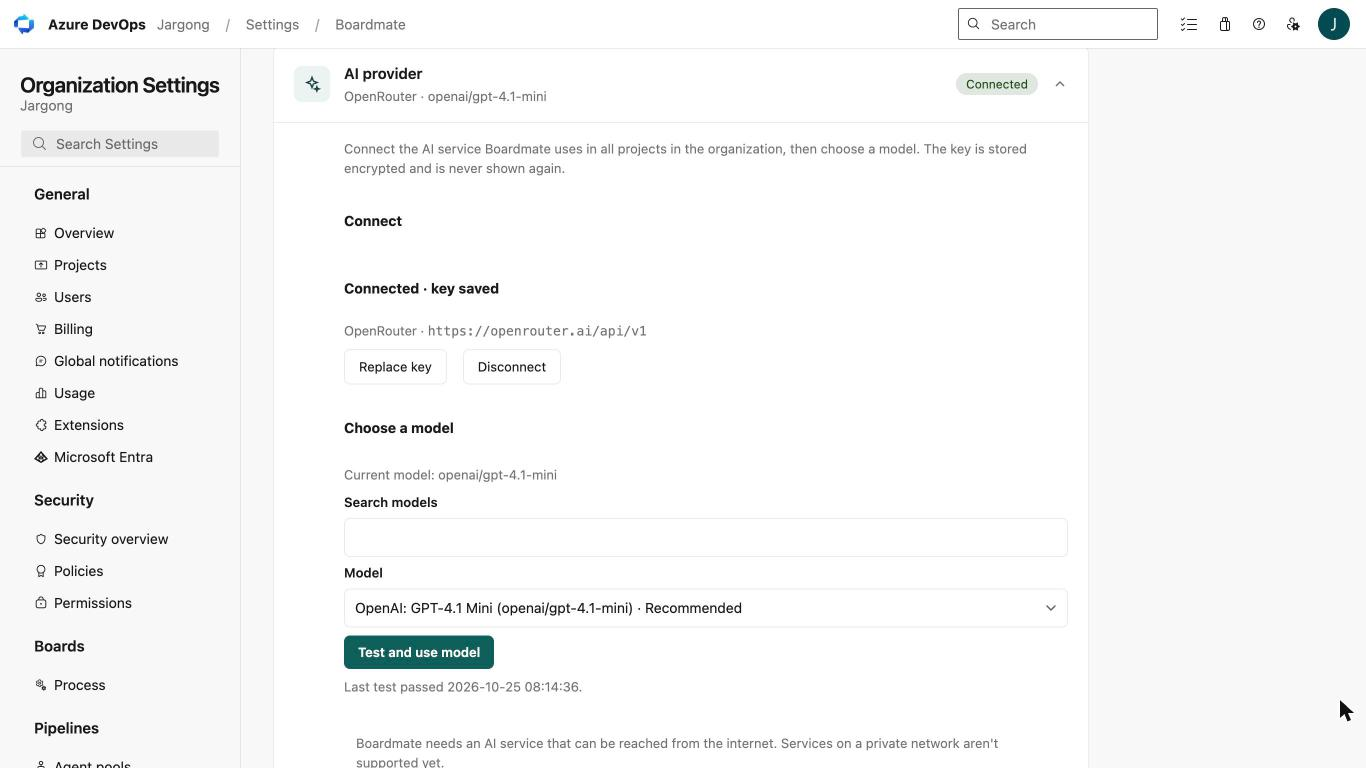
Your AI provider, set up once

An organization admin connects OpenAI, Azure OpenAI, Anthropic or any OpenAI-compatible service, picks a model and runs the built-in test. The key is encrypted and never shown again.

Organization settings → Boardmate → AI provider, connected to OpenRouter with a model selected
How it works

Up and running in a few minutes

  1. Install from the Marketplace

    An organization administrator installs Boardmate for the Azure DevOps organization. The 30-day trial starts at first use.

  2. Connect your AI provider

    In Organization settings → Boardmate → AI provider, enter the API key and pick a model. The key is encrypted and never shown again.

  3. Ask, review, approve

    Open a work item or the Boards hub. Boardmate suggests; your team reviews and approves every change.

Security by design

  • Every tool call runs with the user's own Azure DevOps token and permissions
  • Nothing is written to Azure DevOps without the user's approval
  • The AI key is encrypted with AES-256-GCM and never leaves the backend
  • Work item, wiki and code content is processed in memory and never stored
  • Backend and database in Frankfurt, Germany (EU)
  • No content in logs; users appear only as pseudonyms in statistics
Read the privacy policy →
Why Boardmate

Built for teams that live in Azure DevOps

All in one place, inside Azure DevOps

Chat, field suggestions, breakdowns and spec health live where your team already works: the work item form, the Boards hub and the settings pages. No second tool, no copy and paste.

Bring your own AI, run no infrastructure

Connect OpenAI, Azure OpenAI, Anthropic, OpenRouter or any OpenAI-compatible endpoint such as LiteLLM. You keep your model choice and your AI contract; Hardyson runs the rest.

One fixed price per organization

A yearly price per Azure DevOps organization instead of per seat. From roughly ten users it typically costs less than tools priced per user per month.

Free forever without AI

After the trial, the Insights rule checks, field mapping and usage statistics keep working without a license. Only the AI features need one.

Works with your process

Inherited and custom processes, renamed and custom work item types: Boardmate reads the type categories and lets each project map its own fields.

Your data stays in the EU

The backend and its database run in Frankfurt. Work item, wiki and code content is processed in memory and never stored.

Compare

How Boardmate compares

Other AI tools for Azure DevOps, as described on each vendor's own website or Marketplace listing in October 2026. Details change; check the vendor's page for current information.

Swipe sideways to see every column.

Aspect Boardmate Hardyson Copilot4DevOps Modern Requirements ClearSpecs AI Publisher FJANIT AI Work Item Assistant Microsoft Digital
Runs inside Azure DevOps YesYesYesYes, embedded in work items
Where the AI comes from Your own provider and key (OpenAI, Azure OpenAI, Anthropic, OpenAI-compatible)Not stated; a "Bring Your Own LLM" add-on for custom training is listedHosted by the vendor; no API keys neededMicrosoft Foundry
Pricing model Fixed price per organization per year, by active usersPlans by token volume (Lite, Plus, Ultimate)Free tier and yearly plans; all plans allow unlimited usersDescribed in a Microsoft Inside Track article, not a priced listing
Chat over the backlog Yes, plus wiki, repo docs, code and pull requestsYesYesNot stated
Generates work items Yes: child items, test cases and new items from the chatGenerates requirements and test casesYes, child item generationHelps create and refine work items

All product names are trademarks of their respective owners.

Pricing

One price per organization, not per seat

Yearly, by active users in the last 30 days. Every tier includes every feature. Prices exclude VAT.

Currency

Team

Up to 25 active users

€590 $690 per organization / year

or $690 in USDor €590 in EUR, excl. VAT

For a team or a small organization getting started with AI in Azure Boards.

  • Every Boardmate feature
  • Up to 25 active users
  • Email support
Start 30-day free trial

Enterprise

Unlimited active users

€3,900 $4,500 per organization / year

or $4,500 in USDor €3,900 in EUR, excl. VAT

For large organizations. Pay by card, or by invoice and purchase order on request.

  • Every Boardmate feature
  • Unlimited active users
  • Invoice and PO on request
Start 30-day free trial

Full pricing details · Non-AI features are free forever.

FAQ

Questions teams ask

Something else? Email support@hardyson.se or visit Support.

Which Azure DevOps versions are supported?

Azure DevOps Services (the cloud service at dev.azure.com). Azure DevOps Server installed on your own servers is not supported.

Do I need my own AI subscription?

Yes. An organization administrator connects your own AI provider once: OpenAI, Azure OpenAI, Anthropic, OpenRouter or any OpenAI-compatible endpoint with streaming and tool calls. The endpoint must be reachable from the internet over HTTPS. AI usage is billed by your provider under your own contract.

Is our content stored?

No. Work items, wiki pages and code are read with the signed-in user's own Azure DevOps token, processed in memory in Frankfurt and never stored. Boardmate stores only usage metadata (users as pseudonyms), your AI provider settings with the key encrypted, short-lived rate-limit counters and your organization's id and name.

Can the assistant change things on its own?

No. Every change is shown as a suggestion card or a plan, and nothing is written to Azure DevOps until a user approves it. Every call runs with that user's own permissions, so the assistant can never see or do more than the user can.

What happens when the trial ends?

Every organization gets 30 days with everything included from its first use, with no card needed. Afterwards the AI features ask for a license ("Upgrade"); no data or settings are lost, and the non-AI features keep working for free.

Who counts as an active user?

A distinct person who used a Boardmate AI feature in your organization during the last 30 days. People who never use Boardmate are not counted.

How do we buy?

An organization administrator opens Organization settings → Boardmate → Plan & billing, chooses a tier and currency and selects Upgrade. Checkout is handled by Paddle.com, our reseller and Merchant of Record, which also issues the invoice and handles VAT. Enterprise customers can ask for an invoice and purchase order.

Try Boardmate free for 30 days

Everything included. No card. Bring your own AI provider.

Install from the Marketplace